Simple Operating System to Display Hardware Details (Biru_OS )
November 11, 2022
Read on MediumThis article is written for academic work in University. The article explains the steps I did to develop an operating system which displays the details of the hard disk. This OS is developed by extending another OS called JOSH operating system which is also developed for academic purpose
The functional code to display hardware information is developed in the assembly language. The QEMU emulator is used to run the OS using floppy image and also this OS can made to run in VirtualBox using the CD image.
Pre-Requirements for development
the NASM assembler, dosfstools package, ‘mkisofs’ utility, VirtualBox or qemu and root access.
We need root access because we loopback-mount the floppy disk image to insert our files.
Bootloader
The bootloader is the program which gives the control of the system to the computer. Before the coding process, first create a root directory and to better arrange our files create a folder and name it as source and within that folder create another folder called bootloader. The development of the bootloader is a long and time-consuming process therefore I extended this part from the JOSH operating system without any modifications
copy the below code and save it as bootload.asm and save in the boot load directory. To compile the above assembly file, use the command
nasm source/bootload/bootload.asm -o source/bootload/bootload.bin -f binhttps://medium.com/media/517c6d9e15fe8b67f12dcf13183afcc1/href
The kernel is the heart of the OS it does all the heavy lifting for the operating system. After the boot-load we have to also create kernel for our OS. In the data segment for the kernel, I wrote following assembly code
https://medium.com/media/3c345911eef1e937b52b822d80bd6c18/hrefThis will display a welcome message for the users. Now we can write relevant functions to display the details of the hardware device
(1) Display CPU Vendor ID
The CPUID opcode is a processor supplementary instruction for the x86 architecture that gives information about the CPU. By using this code OS can determine the type of processor
https://medium.com/media/63f5f75d5cac826ffe440c86e1c02d27/href(2) To display details about processors
https://medium.com/media/88ed331e0cf574b0bc9bd11b6f6e3cc2/href(3) Number of floppy drives in the system
https://medium.com/media/73ad10f8d2fe380b3b0d5cb617d75077/href(4) Number of serial ports and parallel ports
https://medium.com/media/e1c6470559844a235b84157b32bda70f/href(5) Memory Information
https://medium.com/media/0fa80c67003b3347e505904d1974e5f3/href(6) Number of Hard drives
https://medium.com/media/57d82df9b3b354ac5f9a5d9453150ec5/hrefAs we did for the bootloader, we have to compile the code for the kernel. Use the following command
nasm source/kernel.asm -o source/kernel.bin -f bin
Finally, I used the build-linux.sh file from MikeOS to compile the entire application. This makes it simpler to compile the entire program because build-linux.sh is a separate shell script file that contains all the terminal commands required to compile the OS, produce the iso image, and create the floppy image. If we don’t use such file, we have to enter every command separately and compile
Use the following code for build-linux file
https://medium.com/media/2b0be381b9108931029f22784fe3436a/hrefwe can execute the above code using the terminal command
sudo bash ./build-linux.sh
Now I can run the extended josh OS (Biru_OS) using the floppy image in QEMU emulator. To run use the following command
qemu-system-i386 -fda ./disk_images/MikeOS.flp
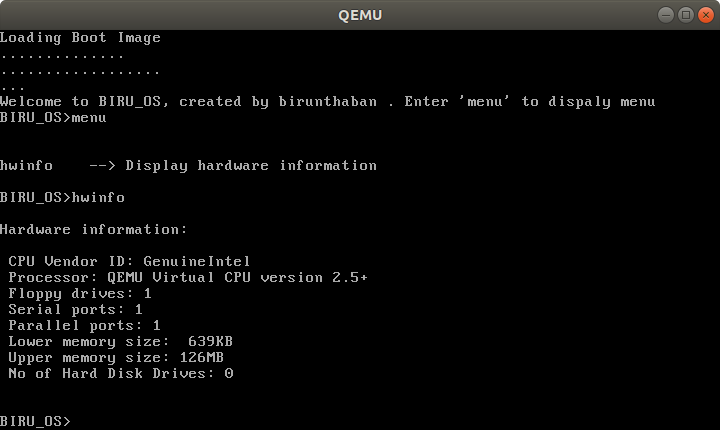
And this concludes this article on displaying hardware information. The GitHub repository for this article can be found here:
Birunthaban/Biru_OS (github.com)
References:
Simple Operating System — TLUX_OS | by Thiluxan | Medium
— Birunthaban Sarventhiran —