Building a secure web application with OIDC and defend against top OWASP vulnerabilities
November 23, 2023
Read on Medium
If we take most web applications today , the user authentication and access control are one of the most critical components of the system but it has become pain staking for users to maintain to many identities for different web applications as well as the developers to develop user authentication and access control in addition to their focus on the buisness logic . So it becomes a norm to use a third party cloud identity providers to tackle this issue . The web application (Vehicle Service Registration System ) we are going to build make use of OIDC (OpenID Connect) protocols for user authentication . We will be using third party identity cloud identity provider for login , getting user information for our application and logout functionality . Now let’s dive deep to develop our web application
To develop our app we need to first select some tools to begin with . I’ll be using JSP to create the dynamic web application and run it on apache tomcat server , Asgardeo OpenID Connect as the Identity Provider for this application . It’s also better to develop the application in java specific IDE as it becomes easy to setup server and run our application . Our core app functinality would be minimal like displaying user detail , making a service registration , deleting upcoming service registration , seeing past registration.As our focus is on mainly on integrating the identity and access management . we’ll skip the buisness logic implementation of them for now but the source code can be found here
First we have to have an asgardeo account for our organization and register our application there and do some configurations . The step by step process to register our application is as follows
(1) Register asgardeo account if you don’t have one
(2) On the applications tab, add new traditional web application as we develop in JSP and select the protocol (In our case OIDC) .make sure to give the redirect url using how you will run the application . it would be something like this (configure accordingly how the project you will be creating)
http://localhost:8082/Drive_Care_Connect/authorization.jsp
(3) after that select the application created and select user attributes tab and select all the user you need from user .In my case i selected address , profile ,phone number and email
Upon registering the web application, a unique client ID and client secret will be are automatically generated for our application . These credentials helps our web application to interact with Asgardeo. Access to the client ID and secret can be found in Protocol tab of the application.
To get the identity we have to send a login request from our application to asgardeo
# OAuth 2.0 client credentials
oauth.client_id=your_secret_id
oauth.client_secret=your_secret


# OAuth authorization endpoint and parameters
oauth.auth_endpoint=https://api.asgardeo.io/t/<your organization>/oauth2/authorize
oauth.scope=openid address email phone profile
oauth.response_type=code
oauth.redirect_uri=your redirect link
oauth.post_logout_redirect_uri =your redirect url
<%
Properties props = new Properties();
InputStream input = getServletContext().getResourceAsStream("/WEB-INF/authorization.properties");
props.load(input);
%>

<button
<a href="<%= props.getProperty("oauth.auth_endpoint") %>?scope=<%= props.getProperty("oauth.scope") %>&response_type=<%= props.getProperty("oauth.response_type") %>&redirect_uri=<%= props.getProperty("oauth.redirect_uri") %>&client_id=<%= props.getProperty("oauth.client_id") %>">
                        Login
                    </a>
</button>
make sure to set the properties in a properties file to ensure that no sensitive data is exposed . the user then will be redirected to sign-in page of asgardeo if it is a first time the user may have to give consent else if the credentials are correct the the asgardeo will send the authorization code . with this authorization code , we can get access token and id token by sending the authorization code . make sure to send the following properties to the token endpoint and as always use the properties file rather than hard coding it
    String clientId = props.getProperty("oauth.client_id");
    String clientSecret = props.getProperty("oauth.client_secret");
    String redirectUri = props.getProperty("oauth.redirect_uri");
if the request is successful we will recieve the access token and id token and store them as session variables and the user will be redirected to home page . in the home page we will be displaying the user information if the access token and id token are not empty (obtained in session variable) we would be sending request to userinfo endpoint of asgardeo to get the user information . if it is sucessful we can read the json response and can display user details .
oauth.userinfo_endpoint=https://api.asgardeo.io/t/<give your organization name>/oauth2/userinfo
    if (accessToken != null && !accessToken.isEmpty()) {
        // Define userinfo endpoint
        // Read properties from the authorization.properties file
Properties props = new Properties();
InputStream input = getServletContext().getResourceAsStream("/WEB-INF/authorization.properties");
props.load(input);
String userinfoEndpoint = props.getProperty("oauth.userinfo_endpoint");
String introspectionEndpoint = props.getProperty("oauth.introspection_endpoint");
try {
            // Create a URL object for the userinfo endpoint
            URL userinfoUrl = new URL(userinfoEndpoint);

            // Open a connection to the userinfo endpoint
            HttpURLConnection userinfoConnection = (HttpURLConnection) userinfoUrl.openConnection();

            // Set the request method to GET
            userinfoConnection.setRequestMethod("GET");

            // Set the Authorization header with the access token
            userinfoConnection.setRequestProperty("Authorization", "Bearer " + accessToken);

            // Get the response code from the userinfo endpoint
            int userinfoResponseCode = userinfoConnection.getResponseCode();

            // Read the response data from the userinfo endpoint
            try (BufferedReader userinfoReader = new BufferedReader(new InputStreamReader(userinfoConnection.getInputStream()))) {
                String userinfoInputLine;
                StringBuilder userinfoResponse = new StringBuilder();

                while ((userinfoInputLine = userinfoReader.readLine()) != null) {
                    userinfoResponse.append(userinfoInputLine);
                }

                // Parse the userinfo response data as JSON
                JSONObject userinfoJson = new JSONObject(userinfoResponse.toString());

                // Extract user information
                String username = userinfoJson.optString("username");
                String name = userinfoJson.optString("given_name");
                String email = userinfoJson.optString("email");

                String contactNumber = userinfoJson.optString("phone_number");
                String lastname = userinfoJson.optString("family_name");
                JSONObject addressObject = userinfoJson.optJSONObject("address");

                // Extract the "country" property from the "address" object
                String country = (addressObject != null) ? addressObject.optString("country") : "";

                session.setAttribute("username", username);
%>
The below image shows the flow of the authorization in a visual manner

So this is all we have to do to integrate the Identity and Access Management Functionality for our web application now let’s look at functionalities of our web application and see how to mitigate the web based vulnerabilities of the website
Registering for a services , viewing all the services and deleting all the services
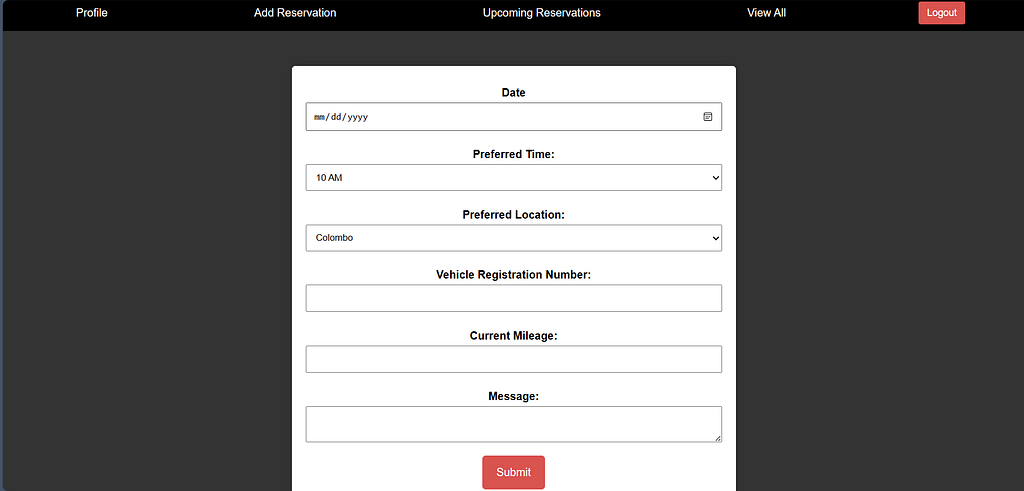
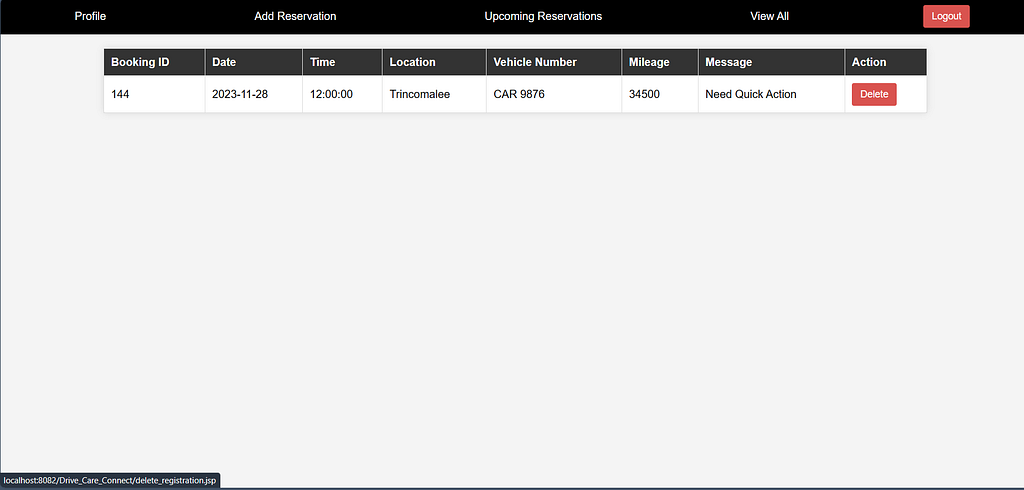
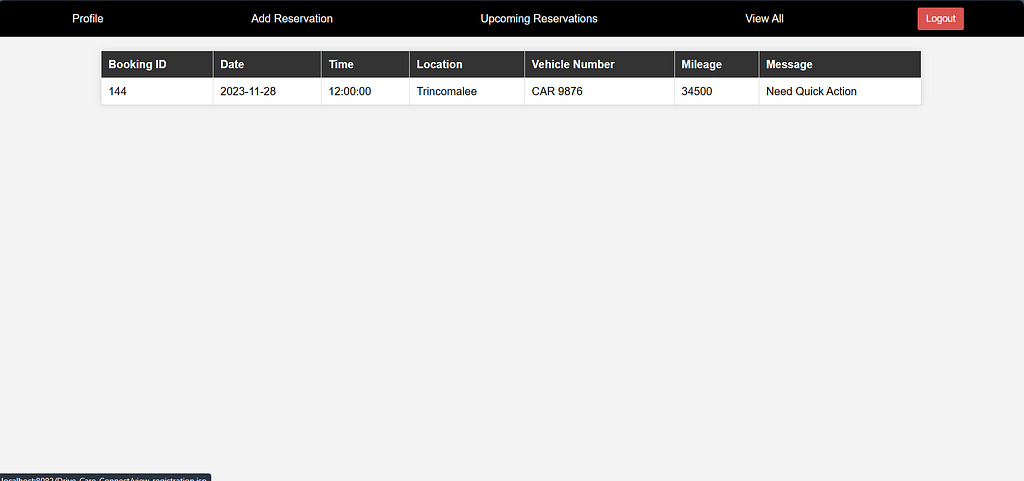
If you have a look at the source code provided earlier you can observe that this application has security features.
Authentication Barrier: I've implemented a robust authentication check at the beginning of the script using AuthenticationUtil.isAuthenticated(request). This check ensures that only authenticated users have access to the vehicle service reservation functionality. If someone attempts unauthorized access, the script redirects them promptly to the login page (index.jsp). This authentication barrier is crucial as it acts as a protective shield, thwarting potential security breaches from unauthorized entities.
Secure Database Interaction: The script heavily relies on interactions with a backend database. To safeguard against SQL injection attacks, I've diligently employed prepared statements when inserting data into the database. This coding practice ensures that user inputs are treated as data, eliminating the risk of them being executed as malicious code. Moreover, I've taken care to manage the database connection appropriately, significantly reducing the likelihood of unauthorized access. This meticulous handling of database interactions serves to fortify the overall integrity of the system.
Input Validation Safeguards: Recognizing the significance of maintaining data integrity, I've implemented robust input validation mechanisms. Specifically, I've scrutinized the selected date to ensure it is neither a Sunday nor earlier than the current date. This validation step serves as a crucial defense against potential vulnerabilities associated with date-related inputs, allowing only valid dates to be processed. By enforcing these stringent checks, the script reinforces itself against potential exploits linked to user-submitted data.
Cross-Site Scripting (XSS) Mitigation: In addressing the risk of Cross-Site Scripting (XSS) attacks, I've taken a cautious approach when handling user-controlled data on the web page. I refrain from directly incorporating user input into the webpage without proper encoding. This careful strategy prevents scenarios where user data could be executed as script code on the client side, thereby enhancing the security of the application against a prevalent class of web-based vulnerabilities.
Learning Outcomes
- Security Measures Against OWASP Top Vulnerabilities:
- Authentication check at the beginning of the script helps prevent unauthorized access.
- Use of prepared statements protects against SQL injection attacks.
- Robust input validation guards against date-related vulnerabilities.
- Careful handling of user-controlled data mitigates Cross-Site Scripting (XSS) risks.
2.Authentication Flow:
- Implementing a secure authentication flow involves sending a login request, obtaining an authorization code, and exchanging it for access and ID tokens.
- Ensuring the use of secure channels (HTTPS) and protecting client credentials adds an extra layer of security.
3.Use of OIDC for Identity and Access Management:
- Leveraging OpenID Connect (OIDC) for user authentication is a robust choice, especially when integrating with third-party cloud identity providers like Asgardeo.
- OIDC provides a standardized and secure way to manage user identity and access control.
And that’s a wrap! We’ve successfully completed the development of our web application, complete with integration with a cloud-based Identity Provider (IDP). For those eager to explore the intricacies of the project, the associated git repository is accessible through the provided link.
As we reflect on this journey, it’s crucial to recognize that success in the digital age extends beyond merely adopting the latest technologies. It hinges on the thoughtful integration of these tools to elevate the user experience and safeguard sensitive information. Our focus on constructing a secure web application and seamlessly connecting it with a cloud-based IDP is not just about meeting the expectations of today’s tech-savvy users but also about laying a robust groundwork for what lies ahead.
In conclusion, building a secure web application and integrating it with a cloud-based IDP is a strategic investment in the future. It’s a commitment to meeting evolving consumer demands and ensuring the longevity and resilience of the digital solutions we create. So, as you embark on your own digital ventures, remember the importance of thoughtful integration, user-centric design, and a steadfast dedication to security. These elements are not just features; they are the building blocks of a successful digital future.
https://wso2.com/asgardeo/docs/get-started/try-your-own-app/java-ee-oidc/#prerequisites